
Close Menu
Entertainment Industry Reporter
    Facebook X (Twitter) Instagram
    Entertainment Industry Reporter
    • Home
    • Film
    • Television
    • Box Office
    • Reality TV
    • Music
    • Horror
    • Politics
    • Books
    • Technology
    • Popular Music Videos
    • Cover Story
    • Contact
      • About
      • Amazon Disclaimer
      • DMCA / Copyright Disclaimer
      • Privacy Policy
      • Terms and Conditions
    Entertainment Industry Reporter
    You are at:Home»Technology»How To Get Started With Shortcuts On Your MacBook
    Technology

    How To Get Started With Shortcuts On Your MacBook

    By AdminSeptember 29, 2026
    Facebook Twitter Pinterest LinkedIn Tumblr Email
    How To Get Started With Shortcuts On Your MacBook


    Automate your Mac with ease using Shortcuts and Apple Intelligence.
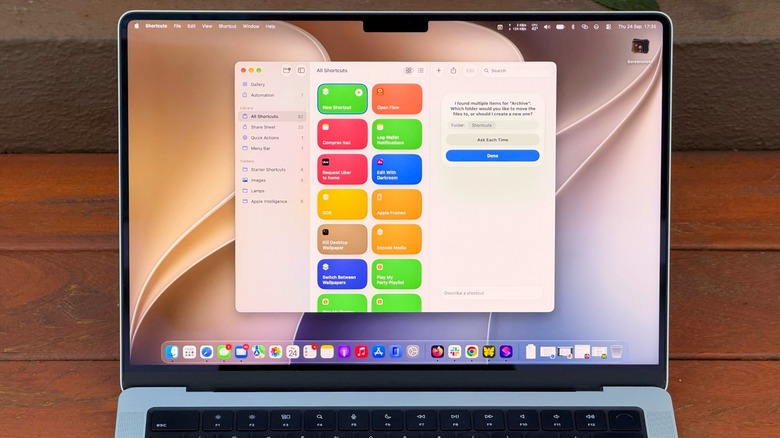

    Apple's Shortcuts app on a MacBook, shown on the main desktop.
    Filipe Espósito for Engadget

    Shortcuts has been available on Mac since macOS Monterey, but it’s one of those utilities many Mac users have never explored. At first, it can seem too complicated. You have to know which actions to choose and how to connect them, then hope it all works. 

    But macOS 27 Golden Gate changes that with Describe a Shortcut, which lets you type exactly what you need and have Shortcuts do the heavy work for you with AI. It doesn’t always work, but it makes the app much easier to use — especially if you’re not an expert.

    If you’re not familiar with Shortcuts, it’s an automation tool where you create scripts to handle tasks on your devices. Apple’s own example is a shortcut that texts your spouse with an estimated arrival time based on traffic when you’re leaving work. But you can get much more complex, like a shortcut that checks your calendar and the weather to give you a summary of what to expect today. 

    There are many possibilities, and now with macOS 27, it’s much easier to master the app.

    Creating shortcuts on your Mac is easy
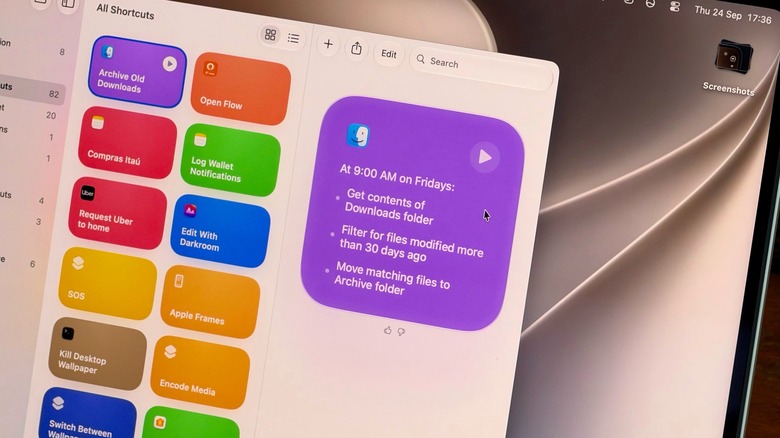

    Apple's Shortcuts app on a Mac, showing a recently created shortcut to clean up the user's Downloads folder.
    Filipe Espósito for Engadget

    Creating a new shortcut takes a few seconds. Open the Shortcuts app on your Mac and click the Plus button to enter a prompt. The more details you provide, the more likely the app is to get your shortcut right. A command like “Clean up my Downloads” might be too vague for the app to understand what you really want. Instead, try something like “Every Friday, move anything in my Downloads folder older than 30 days into a folder called Archive.” You’re more likely to end up with a working shortcut when you provide clear details.

    This is a good example of how Shortcuts are helpful for tasks you often forget to do; no one really cleans out their Downloads folder unless they’re trying to free up space. Plus, you can check the result right away by opening the folder and looking at what moved. If the shortcut moved too much, re-enter the prompt with even more specific details. 

    A shortcut can also be great for summarizing long text with Apple Intelligence. Try something like “Take the text on my clipboard, summarize it in three sentences and save it to a new note.” Then copy a long article or an email, run the shortcut and you’ll have the short version in Notes.

    Make your shortcuts easier to reach
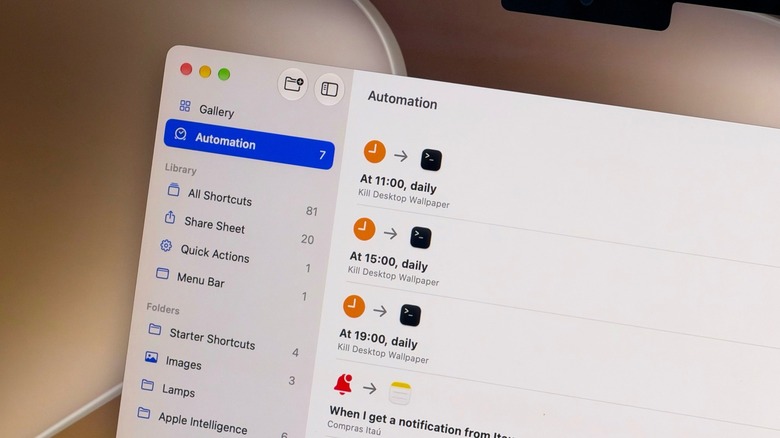

    Various automated actions in Apple's Shortcuts app.
    Filipe Espósito for Engadget

    If a shortcut isn’t part of your normal routine, chances are you’ll forget about it after a while. Thankfully, you can assign a keyboard combo to a shortcut, or pin it to the menu bar, so you’ll never forget it. 

    Choose the shortcut you want to adjust and click Edit. Go to the Shortcut Details menu (the one with the information icon) and select Add Keyboard Shortcut. To add it to the Control Center or menu bar, open Control Center on your Mac (at the top-right) and select Edit Controls. There, all you have to do is add the action from the Shortcuts app, and you’re all set. Exploring the Automation tab is also a good idea for creating a seamless workflow of shortcuts that run on their own when you need them.

    Shortcuts isn’t the only element in macOS 27 that acts on your behalf. Visual Intelligence has its own key combo: Shift + Command + Space. After pressing this, select a window on-screen and have Siri answer questions about it or take action, like adding an event to your calendar. Try it on an email with a date buried in it, for example. Siri can also run your shortcuts via voice, speaking of which.

    Shortcuts and Siri AI require Apple Intelligence, which means you need a Mac with an M1 chip or later — Intel Mac users are out of luck. Also, some limits may apply when using Apple’s AI models in Shortcuts. More complex prompts could reach a limit faster.


    Original Source Link

    Share. Facebook Twitter LinkedIn Email Telegram WhatsApp

    Related Posts

    Meta-Led Anti-Terrorism Group Faces Mass Resignation of Expert Advisers

    Which Is Better To Use?

    Best Party Speakers (2026): JBL, Sony, Marshall, and More

    Why We Won’t Know How Visible The iPhone Duo’s Crease Is For A Long Time

    Old-School Credit Card Scams Are Far From Dead

    How To Stop Meta Training Its AI Models On Your Smart Glasses’ Visual Data

    Popular Posts

    Victims blast DOJ for incomplete release of documents

    Light in the darkness: David Lynch’s Dune

    Tyla Flaunts Her Curves & Body Gems in Blinding Bra Top & Bikini Bottom

    Weekend predictions: Five Nights aiming for mid-50s

    I can’t wait to release the ‘BIG FU’ music video!!!!! I hope you gonna like it as much as I do 🤗

    Georgina Rodriguez Stuns in Alo Top With Bold Neckline & Fur Collar

    Weekend predictions: How to Train Your Dragon heading to roaring opening

    Categories
    • Books (2,375)
    • Box Office (1,747)
    • Cover Story (48)
    • Events (35)
    • Featured (50)
    • Film (2,395)
    • Horror (2,378)
    • Lifestyle (11)
    • Music (2,468)
    • Music & Film Reviews (1)
    • Politics (1,525)
    • Popular Music Videos (1,808)
    • Reality TV (1,834)
    • Technology (2,386)
    • Television (2,165)
    • Uncategorized (1)
    Archives
    Useful Links
    • About
    • Contact
    • Privacy Policy
    • DMCA / Copyright Disclaimer
    • Amazon Disclaimer
    • Terms and Conditions
    Categories
    • Books (2,375)
    • Box Office (1,747)
    • Cover Story (48)
    • Events (35)
    • Featured (50)
    • Film (2,395)
    • Horror (2,378)
    • Lifestyle (11)
    • Music (2,468)
    • Music & Film Reviews (1)
    • Politics (1,525)
    • Popular Music Videos (1,808)
    • Reality TV (1,834)
    • Technology (2,386)
    • Television (2,165)
    • Uncategorized (1)
    Popular Posts

    What We Know So Far

    Mar-a-Lago shooting: Gunman dead; Trump safe

    Imax CEO Rich Gelfond Downplays Hollywood’s China Risk Amid Trade War

    Book Riot’s Deals of the Day for July 26, 2025

    © 2026 Entertainment Industry Reporter. All rights reserved. All articles, images, product names, logos, and brands are property of their respective owners. All company, product and service names used in this website are for identification purposes only. Use of these names, logos, and brands does not imply endorsement unless specified. By using this site, you agree to the Terms & Conditions and Privacy Policy.

    Type above and press Enter to search. Press Esc to cancel.

    We use cookies on our website to give you the most relevant experience by remembering your preferences and repeat visits. By clicking “Accept All”, you consent to the use of ALL the cookies. However, you may visit "Cookie Settings" to provide a controlled consent.
    Cookie SettingsAccept All
    Manage consent

    Privacy Overview

    This website uses cookies to improve your experience while you navigate through the website. Out of these, the cookies that are categorized as necessary are stored on your browser as they are essential for the working of basic functionalities of the website. We also use third-party cookies that help us analyze and understand how you use this website. These cookies will be stored in your browser only with your consent. You also have the option to opt-out of these cookies. But opting out of some of these cookies may affect your browsing experience.
    Necessary
    Always Enabled
    Necessary cookies are absolutely essential for the website to function properly. These cookies ensure basic functionalities and security features of the website, anonymously.
    CookieDurationDescription
    cookielawinfo-checkbox-analytics11 monthsThis cookie is set by GDPR Cookie Consent plugin. The cookie is used to store the user consent for the cookies in the category "Analytics".
    cookielawinfo-checkbox-functional11 monthsThe cookie is set by GDPR cookie consent to record the user consent for the cookies in the category "Functional".
    cookielawinfo-checkbox-necessary11 monthsThis cookie is set by GDPR Cookie Consent plugin. The cookies is used to store the user consent for the cookies in the category "Necessary".
    cookielawinfo-checkbox-others11 monthsThis cookie is set by GDPR Cookie Consent plugin. The cookie is used to store the user consent for the cookies in the category "Other.
    cookielawinfo-checkbox-performance11 monthsThis cookie is set by GDPR Cookie Consent plugin. The cookie is used to store the user consent for the cookies in the category "Performance".
    viewed_cookie_policy11 monthsThe cookie is set by the GDPR Cookie Consent plugin and is used to store whether or not user has consented to the use of cookies. It does not store any personal data.
    Functional
    Functional cookies help to perform certain functionalities like sharing the content of the website on social media platforms, collect feedbacks, and other third-party features.
    Performance
    Performance cookies are used to understand and analyze the key performance indexes of the website which helps in delivering a better user experience for the visitors.
    Analytics
    Analytical cookies are used to understand how visitors interact with the website. These cookies help provide information on metrics the number of visitors, bounce rate, traffic source, etc.
    Advertisement
    Advertisement cookies are used to provide visitors with relevant ads and marketing campaigns. These cookies track visitors across websites and collect information to provide customized ads.
    Others
    Other uncategorized cookies are those that are being analyzed and have not been classified into a category as yet.
    SAVE & ACCEPT