
Close Menu
Entertainment Industry Reporter
    Facebook X (Twitter) Instagram
    Entertainment Industry Reporter
    • Home
    • Film
    • Television
    • Box Office
    • Reality TV
    • Music
    • Horror
    • Politics
    • Books
    • Technology
    • Popular Music Videos
    • Cover Story
    • Contact
      • About
      • Amazon Disclaimer
      • DMCA / Copyright Disclaimer
      • Privacy Policy
      • Terms and Conditions
    Entertainment Industry Reporter
    You are at:Home»Technology»Which Connection Is Better For Your Monitor?
    Technology

    Which Connection Is Better For Your Monitor?

    By AdminJuly 2, 2026
    Facebook Twitter Pinterest LinkedIn Tumblr Email
    Which Connection Is Better For Your Monitor?


    HDMI excels for media consumption, while PC gamers prefer DisplayPort.
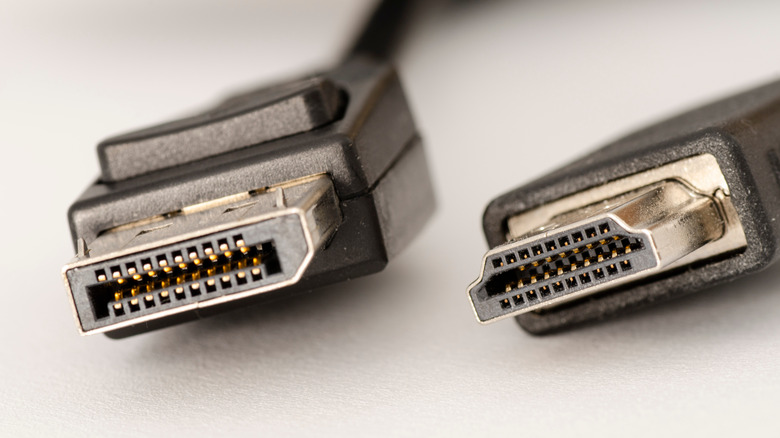

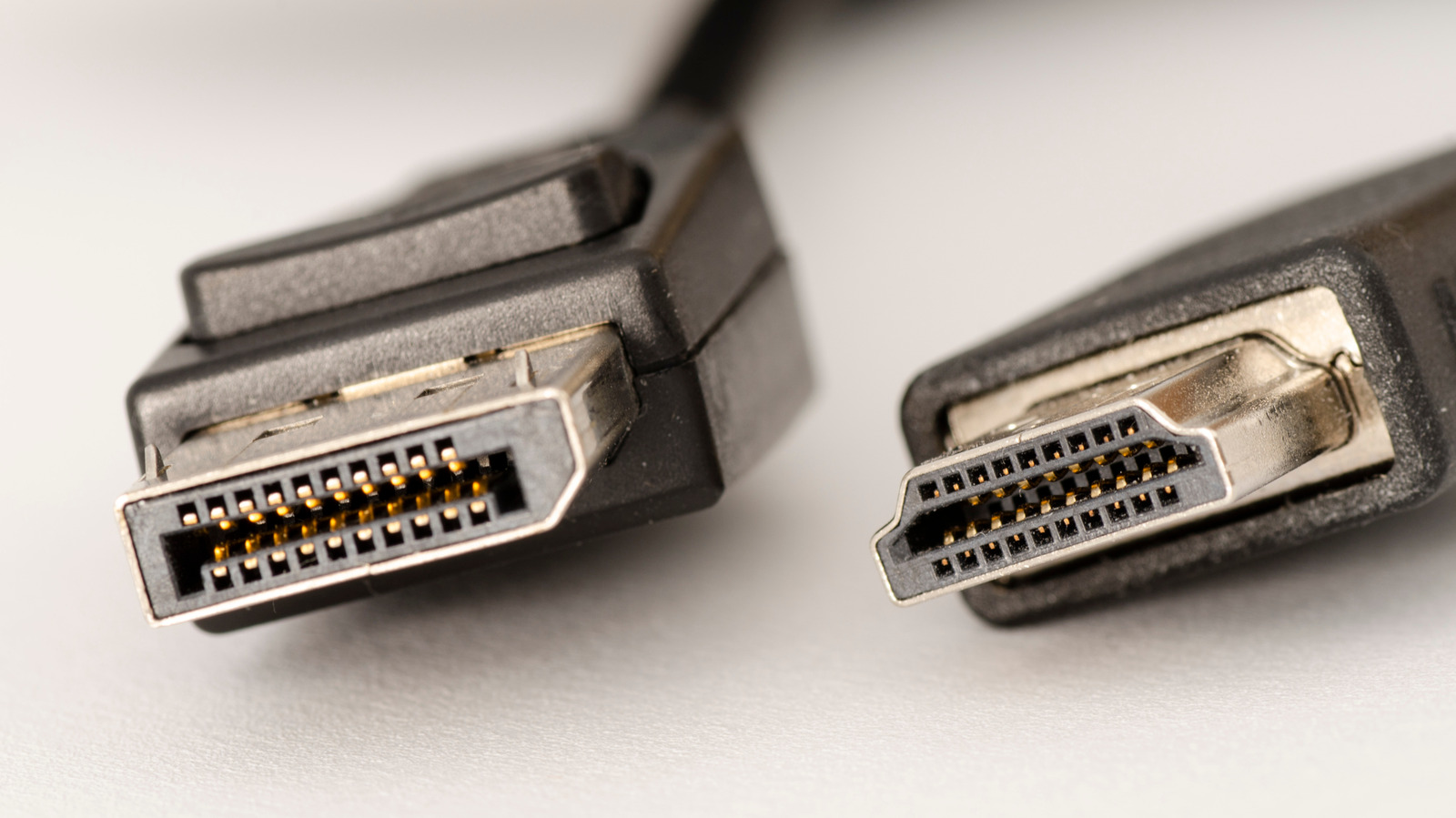
    Close-up of HDMI and DisplayPort connectors
    jverdut/Shutterstock

    While setting up a new PC monitor, you’ll often find two different video cables in the box. One, a pinched trapezoid shape, connects the monitor to a video source over HDMI. The other, with a connector that looks like a rectangle with a corner chopped off, is a DisplayPort cable. But some newer monitors also have a third port for USB-C, and you’ll often find a USB-C port labeled as a video-out port on laptops, too. While having several connection options is convenient, it’s not always clear which is the best for your monitor.

    In general, if you’re connecting your monitor to a PC with a discrete graphics card, or if you want to use multiple monitors, DisplayPort is preferred. On the other hand, if you’re connecting to a Mac or PC with integrated graphics, a TV, home theater equipment, or a gaming console such as an Xbox or PlayStation, HDMI is the safe bet. While DisplayPort has several advantages for gaming and multi-monitor setups, and is also able to run over USB-C on many devices, HDMI is supported across a wider array of A/V equipment and has a number of features which add value for media consumption.

    Ultimately, you should use whichever connection standard is best for your particular setup based on which devices you’re connecting your monitor to, as well as which generations of HDMI or DisplayPort they support. Here’s how HDMI and DisplayPort stack up, so you can determine which is best for your monitor.

    DisplayPort is great for PC gaming, and runs over USB-C


    Man using mobile phone while playing games on PC
    Milan_jovic/Getty Images

    DisplayPort tends not to show up on TVs, but is widely supported among the best gaming monitors and PC graphics cards. Traditionally, that’s because DisplayPort was designed with variable refresh rates in mind. When you watch a movie, it will display at a consistent frame rate, usually 24 frames per-second (FPS). But when playing a game, the frame rate can swing wildly from moment to moment. To make the experience smoother, variable refresh rate (VRR) technology such as AMD FreeSync and Nvidia G-Sync arrived to help coordinate frame rates between the GPU and monitor in a system. DisplayPort has long supported VRR natively, and while some monitors now support VRR standards over HDMI, DisplayPort remains the more robust choice.

    Bandwidth is competitive between the two connection standards. Where HDMI tops out at a hefty 96 gigabits per-second (Gbps) with the latest HDMI 2.2 specification, the more common HDMI 2.1 reaches 48 Gbps. On the most high-end gaming hardware, DisplayPort 2.1 offers 80 Gbps, while 1.4 provides up to 32.4Gbps.

    What clinches DisplayPort for many PC users, though, is its inclusion in the USB-C standard. DisplayPort runs over the USB-C Alternate Mode, meaning that, so long as both a video source and monitor support DisplayPort Alternate Mode, you can connect them with a single USB-C cable. Not all USB-C ports or cables support DisplayPort Alt Mode, so be sure to consult your product documentation.

    Even if you’re not gaming, DisplayPort is often the better choice for multi-monitor due to its daisy chaining support. So long as your monitor has a DisplayPort out port, you can hook one monitor into another rather than using up multiple video out ports on your computer.

    HDMI is best for media consumption


    People on couch watching TV and cheering
    Jertography/Getty Images

    HDMI is best suited to media consumption, such as viewing movies and television shows. It doesn’t really matter whether you’re connecting to a monitor, TV, soundbar, or game console  — nearly every device capable of video output includes an HDMI port. In addition to widespread compatibility, HDMI includes multiple standards needed for premium audio, and to connect home theater equipment, as well as protocols for copyright protected content. All of these advantages make HDMI the default choice for home theaters, but not necessarily for computers.

    Standards like Enhanced Audio Return Channel, or eARC, make HDMI key for entertainment systems. eARC allows a source to send pristine audio to an audio receiver or soundbar, which makes it easy to take advantage of HDMI’s robust support for spatial audio formats including Dolby Atmos and DTS:X. At the same time, HDMI Consumer Electronics Control (HDMI-CEC) can let your devices control one another. For example, press the power button on your Roku remote or PlayStation controller, and your TV will turn on and tune into that A/V source.

    Lastly, HDMI supports digital rights management (DRM) protected content, a major must-have in the era of streaming. It integrates support for high-bandwidth digital content protection (HDCP), which checks to make sure the content you’re watching is properly licensed. Some 4K content from streaming services such as Netflix won’t stream unless connected via a minimum of DisplayPort 1.4 or HDMI 2.0 with HDCP 2.2 and above. In edge cases, you may not be able to stream content from a video source to your TV at all without at least some form of HDCP support.


    Original Source Link

    Share. Facebook Twitter LinkedIn Email Telegram WhatsApp

    Related Posts

    The Google Home Speaker Has Been Secretly Eating My Wi-Fi Data

    Mark Zuckerberg Says Meta Is ‘Entering A New Phase’ With Muse

    Eufy Security Wall Light Cam S4 Deal: Save $80 on This Versatile Gadget

    How Much Power Can A 1kW Wind Turbine Produce For Your Home?

    French Government Calls Emergency Meetings With Platforms Over Protests

    How To Stop Audio From Auto-Playing On Android Auto

    Popular Posts

    Sons of the Forests Endnight Games looking forward to 1.0

    Travis Scott Shares Jackboys 2 Release Date

    9-1-1 Paired With Grey’s Anatomy as ABC Plots 2024 Premiere Dates

    The PS5 Pro is getting upgraded upscaling tech in March

    TikTok will try to force teens to meditate after 10PM

    Q&A: Writer Craig Hurd-McKenney and Artist Noah Bailey Discuss the Deep Space Horrors of Their New Sci-Fi Graphic Novella STATION GRAND

    German Navy looks to replace its outdated floppy disk system for its frigate fleet

    Categories
    • Books (2,422)
    • Box Office (1,784)
    • Cover Story (51)
    • Events (36)
    • Featured (53)
    • Film (2,444)
    • Horror (2,427)
    • Lifestyle (11)
    • Music (2,516)
    • Music & Film Reviews (1)
    • Politics (1,575)
    • Popular Music Videos (1,855)
    • Reality TV (1,882)
    • Technology (2,434)
    • Television (2,215)
    • Uncategorized (1)
    Archives
    Useful Links
    • About
    • Contact
    • Privacy Policy
    • DMCA / Copyright Disclaimer
    • Amazon Disclaimer
    • Terms and Conditions
    Categories
    • Books (2,422)
    • Box Office (1,784)
    • Cover Story (51)
    • Events (36)
    • Featured (53)
    • Film (2,444)
    • Horror (2,427)
    • Lifestyle (11)
    • Music (2,516)
    • Music & Film Reviews (1)
    • Politics (1,575)
    • Popular Music Videos (1,855)
    • Reality TV (1,882)
    • Technology (2,434)
    • Television (2,215)
    • Uncategorized (1)
    Popular Posts

    It’s the last day to get two months of Paramount+ access for only $2

    This Is How Johnnie Walker Made the World’s Lightest Whisky Bottle

    The best Amazon Spring Sale deals on kitchen gear from Ninja, Breville, KitchenAid and others

    CANADIAN BOYFRIEND | Kirkus Reviews

    © 2026 Entertainment Industry Reporter. All rights reserved. All articles, images, product names, logos, and brands are property of their respective owners. All company, product and service names used in this website are for identification purposes only. Use of these names, logos, and brands does not imply endorsement unless specified. By using this site, you agree to the Terms & Conditions and Privacy Policy.

    Type above and press Enter to search. Press Esc to cancel.

    We use cookies on our website to give you the most relevant experience by remembering your preferences and repeat visits. By clicking “Accept All”, you consent to the use of ALL the cookies. However, you may visit "Cookie Settings" to provide a controlled consent.
    Cookie SettingsAccept All
    Manage consent

    Privacy Overview

    This website uses cookies to improve your experience while you navigate through the website. Out of these, the cookies that are categorized as necessary are stored on your browser as they are essential for the working of basic functionalities of the website. We also use third-party cookies that help us analyze and understand how you use this website. These cookies will be stored in your browser only with your consent. You also have the option to opt-out of these cookies. But opting out of some of these cookies may affect your browsing experience.
    Necessary
    Always Enabled
    Necessary cookies are absolutely essential for the website to function properly. These cookies ensure basic functionalities and security features of the website, anonymously.
    CookieDurationDescription
    cookielawinfo-checkbox-analytics11 monthsThis cookie is set by GDPR Cookie Consent plugin. The cookie is used to store the user consent for the cookies in the category "Analytics".
    cookielawinfo-checkbox-functional11 monthsThe cookie is set by GDPR cookie consent to record the user consent for the cookies in the category "Functional".
    cookielawinfo-checkbox-necessary11 monthsThis cookie is set by GDPR Cookie Consent plugin. The cookies is used to store the user consent for the cookies in the category "Necessary".
    cookielawinfo-checkbox-others11 monthsThis cookie is set by GDPR Cookie Consent plugin. The cookie is used to store the user consent for the cookies in the category "Other.
    cookielawinfo-checkbox-performance11 monthsThis cookie is set by GDPR Cookie Consent plugin. The cookie is used to store the user consent for the cookies in the category "Performance".
    viewed_cookie_policy11 monthsThe cookie is set by the GDPR Cookie Consent plugin and is used to store whether or not user has consented to the use of cookies. It does not store any personal data.
    Functional
    Functional cookies help to perform certain functionalities like sharing the content of the website on social media platforms, collect feedbacks, and other third-party features.
    Performance
    Performance cookies are used to understand and analyze the key performance indexes of the website which helps in delivering a better user experience for the visitors.
    Analytics
    Analytical cookies are used to understand how visitors interact with the website. These cookies help provide information on metrics the number of visitors, bounce rate, traffic source, etc.
    Advertisement
    Advertisement cookies are used to provide visitors with relevant ads and marketing campaigns. These cookies track visitors across websites and collect information to provide customized ads.
    Others
    Other uncategorized cookies are those that are being analyzed and have not been classified into a category as yet.
    SAVE & ACCEPT